See it working
Power
- Each lantern runs from one 18650 cell on a charger board — charge via the board's USB socket (red = charging, green = full).
- On power-up the lantern shows a brief warm-candle flash — that's the "I'm alive" cue — then goes dark until a scene fires.
- There's no soft power switch: off between shows means the physical switch, or pulling the cell.
WiFi is the biggest battery drain. Show mode (WiFi off on
first remote press — see the main
guide) is what makes a lantern last a whole performance.
Pairing remote buttons
Lanterns work with ordinary 433 MHz hobby remotes. Any button can drive any scene, and several remotes can drive the same lantern.
- Open the lantern's web page and expand Slots.
- Press + add slot (or open an existing scene card).
- Press Capture — the button pulses while the lantern listens.
- Press the remote button you want. Its code lands in the card instantly (up to six codes per scene, so spare remotes can share scenes).
- Choose what the scene does — a palette colour, an effect, or Off — then Save to prop.
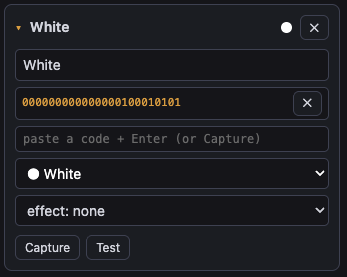
The Last RF code bar at the top of the page shows every code the lantern hears, which is handy for checking a remote's battery or identifying an unknown button. You can also paste a known code into a card by hand.
Scenes on a lantern
| Lights setting | Effect |
|---|---|
| Any palette colour | steady, or candle
(flicker), pulse (slow breathe), twinkle
(sparkle) |
| Off | lantern dark |
| no change | this button leaves the lights exactly as they are (useful in mixed-prop groups) |
A typical show setup is two buttons: one scene with the warm Candle colour + candle effect, one Off scene. The colour lands first and the effect eases in a beat later — that's intentional.
Worth knowing
- Held buttons fire once. Holding a remote button doesn't re-trigger the scene ten times a second — the lantern ignores repeats until you let go.
- Interference is normal. The radio hears constant background noise; lanterns filter it. If a scene ever fires by itself, another remote in the venue shares the same code — recapture with a different button.
- Twenty lanterns, one setup. Configure one lantern,
then use its Fleet page to push the
config to the rest. Use groups (e.g.
lantern-silver/lantern-black) if different sets need different looks.